Imagine this: A potential customer texts your business, eager to learn more. They wait... and wait... for over 90 minutes on average. Meanwhile, the clock is ticking. Research shouts it loud and clear: customers expect a reply within a mere 5 minutes. Every second past that, your chances of converting a lead or satisfying a client plummet. That gaping chasm between what your customers expect and what many businesses deliver is costing you valuable leads, lost sales, and eroding customer trust every single day.
But here's the brilliant news: You don't need to embark on a costly overhaul, invest in a complex new SMS platform, or hire an entire messaging department. With the right blend of smart tools and a few simple habits, your small business or team can realistically slash SMS response times by 80% or more.
This comprehensive guide is your roadmap to achieving precisely that. Let's dive into five concrete, actionable methods that will transform your business SMS communication.
Why Your SMS Response Time is a Game-Changer for Business Growth
When it comes to customer communication, speed isn't just a courtesy; it's a strategic advantage. Let's look at the numbers – they’re striking:
- The First Responder Wins: A staggering 78% of customers will buy from the business that responds first, according to Lead Connect. Think about that: simply being quicker can put you ahead of nearly 80% of your competitors.
- Lead Qualification Skyrockets: Responding to a new lead within 5 minutes makes you an incredible 21 times more likely to qualify them compared to waiting 30 minutes or longer. That’s the difference between a hot lead and a cold trail.
- Conversion Rates Plummet with Delays: Even a 10-minute delay in your text message response can reduce your conversion odds by over 400%. In today's fast-paced world, customer patience is a precious, fleeting commodity.
It doesn't matter if you're a bustling plumbing service, a thriving dental practice, or a cutting-edge consulting firm. The principle holds true across the board: faster SMS replies drive more bookings, boost sales, and cultivate stronger customer loyalty. The real challenge? Crafting thoughtful, accurate responses takes time – time you often don't have when juggling a dozen other critical tasks.
Method 1: Build a Library of Smart, Pre-Built SMS Templates
The fastest response is always the one you've already prepared. For those common questions and routine interactions, SMS templates are your secret weapon. They completely eliminate the need to compose a new message from scratch every single time.
The magic isn't just in having templates; it's in organizing them intelligently. Instead of a chaotic, endless list, categorize your pre-built text message templates for instant access:
- Scheduling & Appointments: Think confirmations, rescheduling options, availability updates, and booking links.
- Customer Support: FAQs, troubleshooting guides, order status checks, and simple return instructions.
- Business Information: Your operating hours, precise location, service menus, and pricing details.
- Proactive Follow-ups: Post-appointment check-ins, gentle reminders, requests for reviews, and heartfelt thank-you notes.
Tools like ReplyRight integrate seamlessly into platforms like Google Messages, allowing you to create and organize these "Quick Reply" templates by category. When a customer's message arrives, you simply click to select the perfect template, sending a complete, professional response in seconds, not minutes.
For most businesses, these smart SMS templates can effortlessly handle 60-70% of all incoming messages. That alone represents an enormous, measurable time saving.
Method 2: Harness the Power of AI-Generated Contextual Replies
While SMS templates are fantastic for the routine, what about the other 30-40% of messages? We're talking about unique questions, specific complaints, or nuanced requests that a pre-written response just won't cut. This is where AI-powered SMS tools truly shine.
AI-generated replies are designed to fill this critical gap. An intelligent AI tool analyzes the entire conversation context and then suggests a perfectly tailored reply that fits the situation like a glove. With a solution like ReplyRight, you can even dictate the tone – professional, casual, direct – and the AI adapts accordingly. You get a perfect draft, review it, and send it.
Consider the time savings: Composing a thoughtful, accurate reply from scratch typically consumes 2-4 minutes of your valuable time. Reviewing and perhaps slightly tweaking an AI suggestion? That takes a mere 15-30 seconds. This is how you reclaim hours in your day, all while delivering exceptional customer service.
Method 3: Master Keyboard Shortcuts for Micro-Optimizations
Every second counts in the race for rapid customer response. Those fleeting moments spent clicking through menus or navigating interfaces add up significantly over dozens of daily conversations. It's time to become a keyboard ninja!
Familiarize yourself with the keyboard shortcuts in Google Messages and any browser extensions you use. Think Tab and Enter for lightning-fast navigation, specific extension shortcuts for triggering AI suggestions instantly, and browser shortcuts like Ctrl+Tab for effortlessly switching between multiple conversations.
These "micro-optimizations" might seem small individually, but across a full day of interactions, they compound into truly meaningful time savings, boosting your SMS efficiency.
Method 4: Enable Web Context for Instant, Accurate Information Lookups
One of the most frustrating delays in business messaging often stems from the need to look up information. A customer asks about your Saturday hours, the cost of a specific service, or your current availability, and you find yourself scrambling to check your website, calendar, or a spreadsheet before you can reply.
Web context awareness obliterates this friction entirely. ReplyRight's innovative Web Context feature allows its AI to reference specific information from a configured webpage – like your business website – when generating reply suggestions. So, if a customer asks what time you close on Saturdays, the AI can instantly pull that data directly from your site and seamlessly integrate it into the suggested reply.
This ingenious feature solves two critical problems: it eliminates delayed responses caused by manual lookups and prevents embarrassing inaccuracies due to misremembered details. The information comes straight from your official published source, ensuring your replies are both fast and impeccably correct.
Method 5: Establish Dedicated SMS Response Windows for Focus
Technology provides incredible leverage, but human habits are equally crucial. Instead of letting text messages trickle in and distract you sporadically throughout the day, create a focused, efficient workflow by establishing dedicated response windows:
- Morning Check (8-9 AM): Start your day strong by tackling any overnight messages and immediately addressing time-sensitive inquiries.
- Midday Sweep (12-1 PM): Catch up on late-morning messages, follow up on pending conversations, and clear your inbox before the afternoon rush.
- Afternoon Close (4-5 PM): Wrap up remaining messages, send any end-of-day confirmations, and ensure a clean slate for tomorrow.
During each designated window, unleash the full power of your SMS templates and AI tools to swiftly move through conversations. This structured approach prevents the constant "context-switching" that not only slows down your messaging but also drains your productivity in other areas of your work. Studies show that regaining focus after an interruption can take an average of 23 minutes – time you can't afford to lose.
Putting It All Together: Your 80% SMS Response Time Reduction Journey
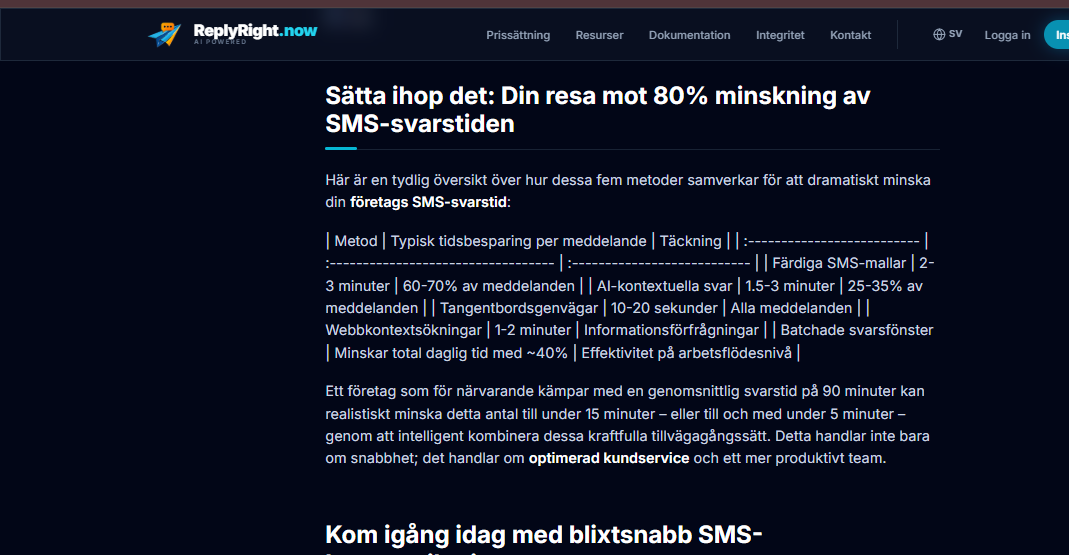
Here's a clear look at how these five methods synergize to dramatically cut your business SMS response time:
| Method | Typical Time Saved per Message | Coverage |
|---|---|---|
| Pre-built SMS Templates | 2-3 minutes | 60-70% of messages |
| AI Contextual Replies | 1.5-3 minutes | 25-35% of messages |
| Keyboard Shortcuts | 10-20 seconds | All messages |
| Web Context Lookups | 1-2 minutes | Information requests |
| Batched Response Windows | Reduces total daily time by ~40% | Workflow-level Efficiency |
A business currently struggling with an average 90-minute reply time can realistically bring that number down to under 15 minutes – or even below 5 minutes – by intelligently combining these powerful approaches. This isn't just about speed; it's about optimized customer service and a more productive team.
Getting Started Today with Lightning-Fast SMS Communication
You don't need to implement every single method at once. Pick the one that addresses your biggest pain point first:
- Drowning in repetitive questions? Start with SMS templates.
- Composing unique replies takes too long? Experiment with AI-generated suggestions.
- Already using Google Messages on the web? Install ReplyRight to get both template and AI capabilities in one intuitive tool.
With free features like Quick Replies and Smart Image Saver, and a 7-day free trial for AI-powered Pro features at just €3.99/month, there's no reason not to start your journey toward faster customer responses today. Transform your business communication and watch your engagement, leads, and customer satisfaction soar!
Frequently Asked Questions about SMS Response Times & AI
What is a good SMS response time for a business?
Under 5 minutes is the gold standard. This is the benchmark most customers expect. Research consistently shows that responding within this window significantly boosts lead conversion rates and overall customer satisfaction. Even achieving under 15 minutes will put your business far ahead of the majority of competitors.
Do I need a dedicated SMS platform to improve response time?
No, not necessarily. If your team already relies on Google Messages on the web for client communication, a lightweight browser extension like ReplyRight can deliver dramatic speed improvements and AI-powered SMS features without requiring an entirely new platform, phone system, or a complete workflow overhaul.
Can templates make customer interactions feel impersonal?
Templates can feel impersonal if used carelessly, but they don't have to. The key is crafting templates that sound natural and warm, rather than robotic. For conversations requiring a deeper personal touch, reserve AI-generated replies which can be customized, or simply type a unique response. Combining both approaches ensures speed without sacrificing warmth or personalization.
How should I handle urgent messages outside my dedicated response windows?
To manage urgent inquiries effectively, set up notification filters that specifically flag messages containing certain keywords (e.g., "urgent," "emergency") or messages from pre-defined VIP contacts. This allows you to catch truly critical inquiries immediately while maintaining your efficient batch-processing for non-urgent messages.
Will AI replies be effective for complex customer conversations?
AI suggestions are surprisingly effective for most conversational contexts, especially when the tool has access to your specific business information through features like web context. For highly sensitive, intricate, or emotionally charged situations, the AI suggestion serves as an excellent starting draft that you can quickly review and refine to ensure perfect accuracy and empathy before sending. It speeds up the process without removing human oversight.